With the Ministry of Power and Energy officially reintroducing the National Fuel Pass in Sri Lanka as of March 15, 2026, every motorist must once again utilize the QR code system for fuel procurement. Whether you are a new vehicle owner or a returning user, this guide provides the fastest way to register and secure your weekly quota.
What is the National Fuel Pass (Fuel QR)?
The National Fuel Pass is a digital quota management system designed to ensure the equitable distribution of fuel across Sri Lanka. Following global supply chain shifts in early 2026, the government has reactivated the system to manage domestic reserves effectively.
Official Portal:https://fuelpass.gov.lk
Beware of phishing sites. Only provide your NIC and Chassis numbers on the official .gov.lk domain.
Step-by-Step: How to Register for Fuel Pass (2026)
If you are registering a new vehicle or a new mobile number, follow these four simple steps:
1. Verification
Visit fuelpass.gov.lk and enter your mobile number. You will receive a 6-digit OTP (One-Time Password) via SMS. Enter this code to verify your identity.
2. Identity Details
Select your identification type:
- NIC (National Identity Card)
- Passport Number
- Business Registration Number (For company-owned vehicles)
3. Vehicle Registration
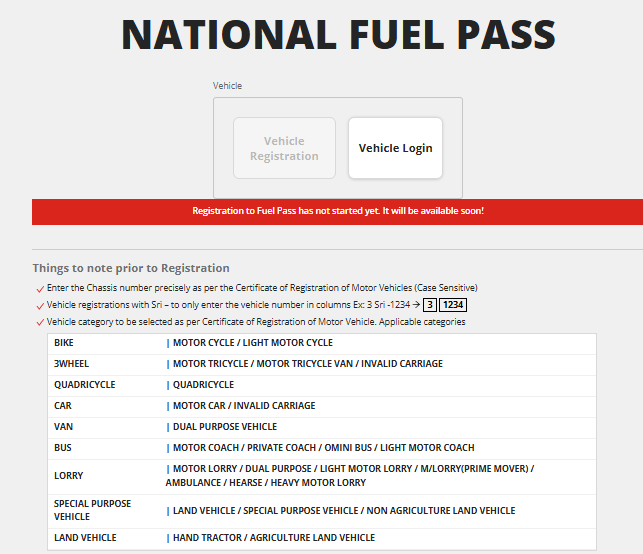
Enter your vehicle details exactly as they appear on your Registration Certificate (CR):
- Vehicle Number: (e.g., WP CAA – 0000)
- Chassis Number: This is a unique 17-character code (usually) found on your CR.
- Vehicle Category: Select from Car, Bike, Three-wheeler, Van, Lorry, etc.
4. Download Your QR Code
Once the Department of Motor Traffic (DMT) validates your details, your unique QR Code will be generated.
- Pro Tip: Take a screenshot and “Favorite” it in your phone gallery, or print a physical copy to keep in your vehicle.
2026 Fuel Quota Allocation Table
The weekly fuel quota is refreshed every Sunday at midnight. Below are the current limits as of March 15, 2026:
| Vehicle Category | Weekly Quota (Litres) |
| Motorcycles / Scooters | 5 Litres |
| Three-Wheelers | 15 Litres |
| Motor Cars | 15 Litres |
| Vans & SUVs | 40 Litres |
| Buses (Private) | 60 Litres |
| Land Vehicles (Tractors) | 25 Litres |
| Lorries & Heavy Trucks | 200 Litres |
How to Check Your Fuel Balance
You don’t need to visit the website to check how many litres you have left for the week. Use the SMS service:
- Format: Type
Fuel[space]Bal[space]VehicleNumber - Send to: 0766220000
- Example:
Fuel Bal WPCAA1234
Common Troubleshooting (FAQs)
My Chassis Number is “Invalid”
Ensure you are not confusing the letter ‘O’ with the number ‘0’. Double-check your CR for the exact sequence. If it still fails, your vehicle might not be updated in the DMT database; contact the 1919 Government Information Centre.
How do I change my mobile number?
If you have lost your registered SIM, you must go to the “Delete Profile” section on the website, verify via your NIC, and re-register with your new mobile number.
Can I use one QR for two vehicles?
No. The 2026 policy strictly enforces one QR per NIC. If you own multiple vehicles, they must be registered under different NICs or Business Registration Numbers.
Summary for Quick Reference
- Mandatory From: March 15, 2026.
- Website: fuelpass.gov.lk
- Requirement: NIC + Chassis Number.
- Stations: Valid at all CPC and LIOC stations island-wide.
This post is updated regularly to reflect the latest changes in Sri Lankan fuel policy. Save this page for future updates.