
Waiting for your GCE O/L 2025 Results can be a nervous time for students and parents alike. To make the process as smooth as possible, the Department of Examinations Sri Lanka provides several fast and reliable ways to check your grades.
In this guide, we will show you exactly how to access your 2025 O/L results using your smartphone or computer, as well as via SMS.
Method 1: Checking Results via Official Websites (Recommended)
The most reliable way to get your results is through the official government portals. These sites are optimized to handle high traffic on the day the results are released.
Steps to check online:
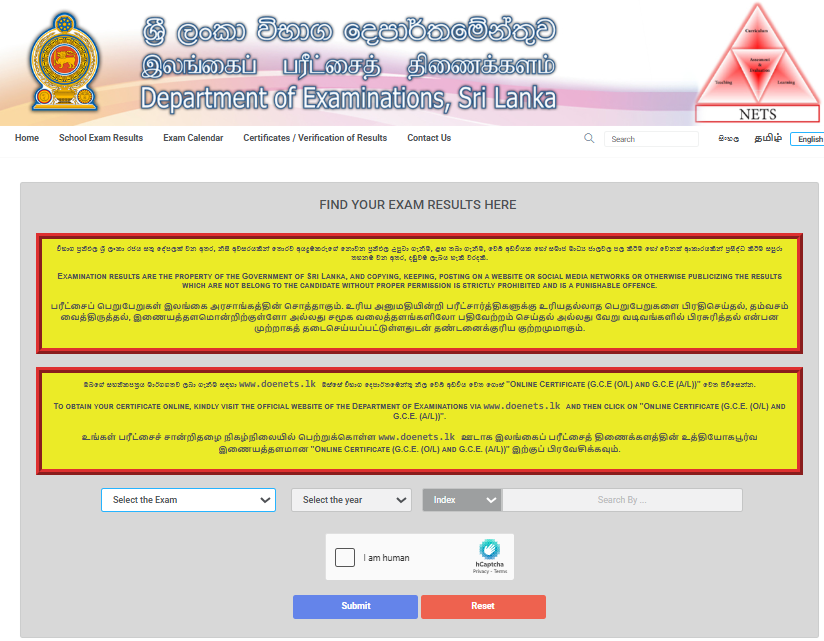
- Visit the official results portal at www.doenets.lk or www.results.exams.gov.lk.
- On the homepage, look for the “Examination Results” section.
- From the dropdown menu, select “G.C.E. (O/L) Examination”.
- Select the year as 2025.
- Enter your Index Number correctly in the provided field.
- (If required) Complete the ‘Captcha’ security check.
- Click the Submit button to view and download your result sheet.
Note: We recommend taking a screenshot or downloading the PDF version of your results for future reference until you receive the official certificate from your school.
Method 2: Checking Results via SMS (Mobile Phones)
If you have a poor internet connection, you can get your results sent directly to your phone. This service is available for Mobitel, Dialog, Airtel, and Hutch users.
How to format the SMS:
- Type:
EXAM[Space]Exam Code[Space]Index Number - Send to: 1919
Example: If your index number is 1234567, you would type EXAM OL 1234567 and send it to 1919.
Method 3: Using the “Doenets” Mobile App
The Department of Examinations has a dedicated mobile app for students.
- Download: Search for the “Doenets” app on the Google Play Store (Android) or Apple App Store (iOS).
- Usage: Simply open the app, navigate to the “Results” tab, and enter your index number. This is often faster than the website during peak hours.
Important Information for Students
What if I forgot my Index Number?
If you have misplaced your index number, you should contact your school principal (for school candidates) or check your admission card. You can also contact the Department of Examinations hotline at 1911 for assistance.
Requesting a Re-Correction
If you are not satisfied with your results, the Department will allow a specific window to apply for re-correction. Keep an eye on teachmore.lk for the updated deadlines and the online application link for O/L re-marking.
Official Certificate Verification
For employment or higher education purposes, you may need an “Officially Accepted Certificate.” You can request this online through the certificate.doenets.lk portal.
Also Check